
For all the new projects that I start with my stakeholders I have been pushing Outside–in software development and Specification by example.
Specification by Example really improves the collaboration between delivery teams and facilitates better engagement with business users. For an in depth look into Specification by Example, you should read Gojko Adzic’s great book Specification by Example: How Successful Teams Deliver the Right Software
Cucumber is my tool of choice for Spec by Example for my Ruby projects. Read The Cucumber Book: Behaviour-Driven Development for Testers and Developers (Pragmatic Programmers)
Developers I work with usually ask questions on how to get started with Specification by Example and Outside-in development. As with most things the best way to explain is with an example.
Let’s build a Rails application that pulls new email from a user’s Gmail account, which we will call Fetch-it.
First we need to install Rails, if we do not already have it installed. For this article we will be using 3.2.3.
[~/ProjectsNew] ➔ Rails -v
Rails 3.2.3
Setting up our project
To get started we will create our Rails app. It is important to note that since we will be using Cucumber we do not need to install test-unit.
[~/ProjectsNew] ➔ rails new fetch-it --skip-test-unit
      create
      create  README.rdoc
      create  Rakefile
      create  config.ru
      create  .gitignore
      create  Gemfile
      create  app
      create  app/assets/images/rails.png
      create  app/assets/javascripts/application.js
      create  app/assets/stylesheets/application.css
      create  app/controllers/application_controller.rb
      create  app/helpers/application_helper.rb
      create  app/mailers
      create  app/models
      create  app/views/layouts/application.html.erb
      create  app/mailers/.gitkeep
      create  app/models/.gitkeep
      create  config
      create  config/routes.rb
      create  config/application.rb
      create  config/environment.rb
      create  config/environments
      create  config/environments/development.rb
      create  config/environments/production.rb
      create  config/environments/test.rb
      create  config/initializers
      create  config/initializers/backtrace_silencers.rb
      create  config/initializers/inflections.rb
      create  config/initializers/mime_types.rb
      create  config/initializers/secret_token.rb
      create  config/initializers/session_store.rb
      create  config/initializers/wrap_parameters.rb
      create  config/locales
      create  config/locales/en.yml
      create  config/boot.rb
      create  config/database.yml
      create  db
      create  db/seeds.rb
      create  doc
      create  doc/README_FOR_APP
      create  lib
      create  lib/tasks
      create  lib/tasks/.gitkeep
      create  lib/assets
      create  lib/assets/.gitkeep
      create  log
      create  log/.gitkeep
      create  public
      create  public/404.html
      create  public/422.html
      create  public/500.html
      create  public/favicon.ico
      create  public/index.html
      create  public/robots.txt
      create  script
      create  script/rails
      create  tmp/cache
      create  tmp/cache/assets
      create  vendor/assets/javascripts
      create  vendor/assets/javascripts/.gitkeep
      create  vendor/assets/stylesheets
      create  vendor/assets/stylesheets/.gitkeep
      create  vendor/plugins
      create  vendor/plugins/.gitkeep
         run  bundle install
Fetching gem metadata from https://rubygems.org/.........
Using rake (0.9.2.2)
Using i18n (0.6.0)
Installing multi_json (1.3.5)
Using activesupport (3.2.3)
Using builder (3.0.0)
Using activemodel (3.2.3)
Using erubis (2.7.0)
Using journey (1.0.3)
Using rack (1.4.1)
Using rack-cache (1.2)
Using rack-test (0.6.1)
Using hike (1.2.1)
Using tilt (1.3.3)
Using sprockets (2.1.3)
Using actionpack (3.2.3)
Using mime-types (1.18)
Using polyglot (0.3.3)
Using treetop (1.4.10)
Using mail (2.4.4)
Using actionmailer (3.2.3)
Using arel (3.0.2)
Using tzinfo (0.3.33)
Using activerecord (3.2.3)
Using activeresource (3.2.3)
Using bundler (1.1.3)
Installing coffee-script-source (1.3.3)
Installing execjs (1.4.0)
Using coffee-script (2.2.0)
Using rack-ssl (1.3.2)
Installing json (1.7.3) with native extensions
Using rdoc (3.12)
Using thor (0.14.6)
Using railties (3.2.3)
Using coffee-rails (3.2.2)
Using jquery-rails (2.0.2)
Using rails (3.2.3)
Installing sass (3.1.19)
Using sass-rails (3.2.5)
Using sqlite3 (1.3.6)
Using uglifier (1.2.4)
Your bundle is complete! Use `bundle show [gemname]` to see where a bundled gem is installed.
[~/ProjectsNew] ➔
Next we need to update our Gemfile with a few dependencies.
[~/ProjectsNew] ➔ cd ./fetch-it/
[~/ProjectsNew/fetch-it] ➔ sudo nano Gemfile
Add the following to the end of our Gemfile
gem 'haml'
gem "mail"
group :test do
  gem 'cucumber-rails'
  gem 'database_cleaner'
  gem 'rspec-rails'
  gem 'factory_girl'
end
Then we need to run bundle again to install the additional gems.
[~/ProjectsNew/fetch-it] ➔ bundle install
Using rake (0.9.2.2)
Using i18n (0.6.0)
Using multi_json (1.3.5)
Using activesupport (3.2.3)
Using builder (3.0.0)
Using activemodel (3.2.3)
Using erubis (2.7.0)
Using journey (1.0.3)
Using rack (1.4.1)
Using rack-cache (1.2)
Using rack-test (0.6.1)
Using hike (1.2.1)
Using tilt (1.3.3)
Using sprockets (2.1.3)
Using actionpack (3.2.3)
Using mime-types (1.18)
Using polyglot (0.3.3)
Using treetop (1.4.10)
Using mail (2.4.4)
Using actionmailer (3.2.3)
Using arel (3.0.2)
Using tzinfo (0.3.33)
Using activerecord (3.2.3)
Using activeresource (3.2.3)
Using addressable (2.2.7)
Using bundler (1.1.3)
Using nokogiri (1.5.2)
Using ffi (1.0.11)
Using childprocess (0.3.2)
Using libwebsocket (0.1.3)
Using rubyzip (0.9.8)
Using selenium-webdriver (2.21.2)
Using xpath (0.1.4)
Using capybara (1.1.2)
Using coffee-script-source (1.3.3)
Using execjs (1.4.0)
Using coffee-script (2.2.0)
Using rack-ssl (1.3.2)
Using json (1.7.3)
Using rdoc (3.12)
Using thor (0.14.6)
Using railties (3.2.3)
Using coffee-rails (3.2.2)
Using diff-lcs (1.1.3)
Using gherkin (2.9.3)
Using term-ansicolor (1.0.7)
Using cucumber (1.1.9)
Using cucumber-rails (1.3.0)
Using database_cleaner (0.7.2)
Using factory_girl (3.2.0)
Using haml (3.1.4)
Using jquery-rails (2.0.2)
Using rails (3.2.3)
Using rspec-core (2.9.0)
Using rspec-expectations (2.9.1)
Using rspec-mocks (2.9.0)
Using rspec (2.9.0)
Using rspec-rails (2.9.0)
Using sass (3.1.19)
Using sass-rails (3.2.5)
Using sqlite3 (1.3.6)
Using uglifier (1.2.4)
Your bundle is complete! Use `bundle show [gemname]` to see where a bundled gem is installed.
[~/ProjectsNew/fetch-it] ➔
Now that we have everything installed we need to generate our required Cucumber directores and files.
[~/ProjectsNew/fetch-it (master)⚡] ➔ rails generate cucumber:install
      create  config/cucumber.yml
      create  script/cucumber
       chmod  script/cucumber
      create  features/step_definitions
      create  features/support
      create  features/support/env.rb
       exist  lib/tasks
      create  lib/tasks/cucumber.rake
        gsub  config/database.yml
        gsub  config/database.yml
       force  config/database.yml
[~/ProjectsNew/fetch-it (master)⚡] ➔
Now that we have our base project setup let’s create a Git repo then add our project.
[~/ProjectsNew/fetch-it] ➔ git init
Initialized empty Git repository in /Users/carlos/ProjectsNew/fetch-it/.git/
[~/ProjectsNew/fetch-it (master)⚡] ➔ git add .
[~/ProjectsNew/fetch-it (master)⚡] ➔ git commit -m "Initial"
[master (root-commit) 4ce447c] Initial
 39 files changed, 1396 insertions(+), 0 deletions(-)
 create mode 100644 .gitignore
 create mode 100644 Gemfile
 create mode 100644 Gemfile.lock
 create mode 100644 README.rdoc
 create mode 100644 Rakefile
 create mode 100644 app/assets/images/rails.png
 create mode 100644 app/assets/javascripts/application.js
 create mode 100644 app/assets/stylesheets/application.css
 create mode 100644 app/controllers/application_controller.rb
 create mode 100644 app/helpers/application_helper.rb
 create mode 100644 app/mailers/.gitkeep
 create mode 100644 app/models/.gitkeep
 create mode 100644 app/views/layouts/application.html.erb
 create mode 100644 config.ru
 create mode 100644 config/application.rb
 create mode 100644 config/boot.rb
 create mode 100644 config/cucumber.yml
 create mode 100644 config/database.yml
 create mode 100644 config/environment.rb
 create mode 100644 config/environments/development.rb
 create mode 100644 config/environments/production.rb
 create mode 100644 config/environments/test.rb
 create mode 100644 config/initializers/backtrace_silencers.rb
 create mode 100644 config/initializers/inflections.rb
 create mode 100644 config/initializers/mime_types.rb
 create mode 100644 config/initializers/secret_token.rb
 create mode 100644 config/initializers/session_store.rb
 create mode 100644 config/initializers/wrap_parameters.rb
 create mode 100644 config/locales/en.yml
 create mode 100644 config/routes.rb
 create mode 100644 db/seeds.rb
 create mode 100644 doc/README_FOR_APP
 create mode 100644 features/support/env.rb
 create mode 100644 lib/assets/.gitkeep
 create mode 100644 lib/tasks/.gitkeep
 create mode 100644 lib/tasks/cucumber.rake
 create mode 100644 log/.gitkeep
 create mode 100644 public/404.html
 create mode 100644 public/422.html
 create mode 100644 public/500.html
 create mode 100644 public/favicon.ico
 create mode 100644 public/index.html
 create mode 100644 public/robots.txt
 create mode 100755 script/cucumber
 create mode 100755 script/rails
 create mode 100644 vendor/assets/javascripts/.gitkeep
 create mode 100644 vendor/assets/stylesheets/.gitkeep
 create mode 100644 vendor/plugins/.gitkeep
[~/ProjectsNew/fetch-it (master)] ➔
Start with our Spec
To get started with development of our Fetch-it email application we are going to first write our spec. We will call this spec Get Email which should clearly explain what feature we are going to implement.
[~/ProjectsNew/fetch-it (master)⚡] ➔ rake db:migrate db:test:prepare
[~/ProjectsNew/fetch-it (master)] ➔ sudo nano ./features/get_email.feature
Feature: Get email
  In order to manage email a user should be able
  get email from their Gmail account

  Scenario: Get new mail from Gmail
    Given the user has a Gmail  account
    When they visit the index page
    Then they will see a list of new email
This simple, clear, and concise spec will allow us to build our application in an iterative Outside-In manner. For the rest of the article we will be following a cadence of running Cucumber to see what step fails, implement our scenarios to pass the step, then repeat until everything passes.
[~/ProjectsNew/fetch-it (master)⚡] ➔ rake cucumber
/Users/carlos/.rvm/rubies/ruby-1.9.3-p0/bin/ruby -S bundle exec cucumber  --profile default
Using the default profile...
Feature: Get email
  In order to manage email a user should be able
  get email from their Gmail account

  Scenario: Get new mail from Gmail          # features/get_email.feature:5
    Given the user has a Gmail  account      # features/get_email.feature:6
      Undefined step: "the user has a Gmail  account" (Cucumber::Undefined)
      features/get_email.feature:6:in `Given the user has a Gmail  account'
    When they visit the index page # features/get_email.feature:7
      Undefined step: "they select get email from the menu" (Cucumber::Undefined)
      features/get_email.feature:7:in `When they visit the index page'
    Then they will see a list of new email   # features/get_email.feature:8
      Undefined step: "they will see a list of new email" (Cucumber::Undefined)
      features/get_email.feature:8:in `Then they will see a list of new email'

1 scenario (1 undefined)
3 steps (3 undefined)
0m0.134s

You can implement step definitions for undefined steps with these snippets:

Given /^the user has a Gmail  account$/ do
  pending # express the regexp above with the code you wish you had
end

When /^they visit the index page$/ do
  pending # express the regexp above with the code you wish you had
end

Then /^they will see a list of new email$/ do
  pending # express the regexp above with the code you wish you had
end

rake aborted!
Command failed with status (1): [/Users/carlos/.rvm/rubies/ruby-1.9.3-p0/bi...]

Tasks: TOP => cucumber => cucumber:ok
(See full trace by running task with --trace)
[~/ProjectsNew/fetch-it (master)⚡] ➔
Why are we seeing that rake aborted error? By default Cucumber is set to strict mode, which is why we are seeing the rake error.
...
rake aborted!
Command failed with status (1): [/Users/carlos/.rvm/rubies/ruby-1.9.3-p0/bi...]

Tasks: TOP => cucumber => cucumber:ok
(See full trace by running task with --trace)
To remove this error we just need to turn off strict mode. This option is configured in our cucumber.yaml.
[~/ProjectsNew/fetch-it (master)⚡] ➔ sudo nano ./config/cucumber.yaml
<%
rerun = File.file?('rerun.txt') ? IO.read('rerun.txt') : ""
rerun_opts = rerun.to_s.strip.empty? ? "--format #{ENV['CUCUMBER_FORMAT'] || 'progress'} features" : "--format #{ENV['CUCUMBE$
std_opts = "--format #{ENV['CUCUMBER_FORMAT'] || 'pretty'} --strict --tags ~@wip"
%>
default: <%= std_opts %> features
wip: --tags @wip:3 --wip features
rerun: <%= rerun_opts %> --format rerun --out rerun.txt --strict --tags ~@wip
We just need to remove the –strict option on for the std_opts, right before the –tags option.
<%
rerun = File.file?('rerun.txt') ? IO.read('rerun.txt') : ""
rerun_opts = rerun.to_s.strip.empty? ? "--format #{ENV['CUCUMBER_FORMAT'] || 'progress'} features" : "--format #{ENV['CUCUMBE$
std_opts = "--format #{ENV['CUCUMBER_FORMAT'] || 'pretty'} --tags ~@wip"
%>
default: <%= std_opts %> features
wip: --tags @wip:3 --wip features
rerun: <%= rerun_opts %> --format rerun --out rerun.txt --strict --tags ~@wip
When we run cucumber again the error should be gone.
[~/ProjectsNew/fetch-it (master)⚡] ➔ rake cucumber
/Users/carlos/.rvm/rubies/ruby-1.9.3-p0/bin/ruby -S bundle exec cucumber  --profile default
Using the default profile...
Feature: Get email
  In order to manage email a user should be able
  get email from their Gmail account

  Scenario: Get new mail from Gmail          # features/get_email.feature:5
    Given the user has a Gmail  account      # features/get_email.feature:6
    When they visit the index page # features/get_email.feature:7
    Then they will see a list of new email   # features/get_email.feature:8

1 scenario (1 undefined)
3 steps (3 undefined)
0m0.066s

You can implement step definitions for undefined steps with these snippets:

Given /^the user has a Gmail  account$/ do
  pending # express the regexp above with the code you wish you had
end

When /^they visit the index page$/ do
  pending # express the regexp above with the code you wish you had
end

Then /^they will see a list of new email$/ do
  pending # express the regexp above with the code you wish you had
end

[~/ProjectsNew/fetch-it (master)⚡] ➔
We have our feature created, but no steps to implement that feature.
Cucumber points us the right direction by giving us examples of steps. What do we do with those examples?
We need to create a file called ./features/step_definitions/get_email_steps.rb and copy the above step definitions examples into that file.
[~/ProjectsNew/fetch-it (master)⚡] ➔ sudo nano ./features/step_definitions/get_email_steps.rb
Given /^the user has a Gmail  account$/ do
  pending # express the regexp above with the code you wish you had
end

When /^they visit the index page$/ do
  pending # express the regexp above with the code you wish you had
end

Then /^they will see a list of new email$/ do
  pending # express the regexp above with the code you wish you had
end
Then we run cucumber again.
[~/ProjectsNew/fetch-it (master)⚡] ➔ rake cucumber
/Users/carlos/.rvm/rubies/ruby-1.9.3-p0/bin/ruby -S bundle exec cucumber  --profile default
Using the default profile...
Feature: Get email
  In order to manage email a user should be able
  get email from their Gmail account

  Scenario: Get new mail from Gmail          # features/get_email.feature:5
    Given the user has a Gmail  account      # features/step_definitions/get_email_steps.rb:1
      TODO (Cucumber::Pending)
      ./features/step_definitions/get_email_steps.rb:2:in `/^the user has a Gmail  account$/'
      features/get_email.feature:6:in `Given the user has a Gmail  account'
    When they visit the index page # features/step_definitions/get_email_steps.rb:5
    Then they will see a list of new email   # features/step_definitions/get_email_steps.rb:9

1 scenario (1 pending)
3 steps (2 skipped, 1 pending)
0m0.071s
[~/ProjectsNew/fetch-it (master)⚡] ➔
You can see that Cucumber is telling us that first first step is pending, let’s implement our first step by creating User and Account instances.
[~/ProjectsNew/fetch-it (master)⚡] ➔ sudo nano ./features/step_definitions/get_email_steps.rb
Given /^the user has a Gmail  account$/ do
  @user = User.create(:email => 'example@example.com')

  account = Account.create account_type:  'gmail',
                           user_name:     'your_user_name',
                           password:      'your_password'
  @user.accounts << account
  @user.save
end

When /^they visit the index page$/ do
  pending # express the regexp above with the code you wish you had
end

Then /^they will see a list of new email$/ do
  pending # express the regexp above with the code you wish you had
end
Back to Cucumber.
[~/ProjectsNew/fetch-it (master)⚡] ➔ rake cucumber
/Users/carlos/.rvm/rubies/ruby-1.9.3-p0/bin/ruby -S bundle exec cucumber  --profile default
Using the default profile...
Feature: Get email
  In order to manage email a user should be able
  get email from their Gmail account

  Scenario: Get new mail from Gmail          # features/get_email.feature:5
    Given the user has a Gmail  account      # features/step_definitions/get_email_steps.rb:1
      uninitialized constant User (NameError)
      ./features/step_definitions/get_email_steps.rb:2:in `/^the user has a Gmail  account$/'
      features/get_email.feature:6:in `Given the user has a Gmail  account'
    When they visit the index page # features/step_definitions/get_email_steps.rb:11
    Then they will see a list of new email   # features/step_definitions/get_email_steps.rb:15

Failing Scenarios:
cucumber features/get_email.feature:5 # Scenario: Get new mail from Gmail

1 scenario (1 failed)
3 steps (1 failed, 2 skipped)
0m0.074s
rake aborted!
Command failed with status (1): [/Users/carlos/.rvm/rubies/ruby-1.9.3-p0/bi...]

Tasks: TOP => cucumber => cucumber:ok
(See full trace by running task with --trace)
We are getting uninitialized constant User (NameError). This makes sense since we do not have a User model defined in our application. Let’s fix it by generating that User model.
[~/ProjectsNew/fetch-it (master)⚡] ➔ rails g model User email:string
      invoke  active_record
      create    db/migrate/20120527212233_create_users.rb
      create    app/models/user.rb
[~/ProjectsNew/fetch-it (master)⚡] ➔ rake db:migrate db:test:prepare
==  CreateUsers: migrating ====================================================
-- create_table(:users)
   -> 0.0207s
==  CreateUsers: migrated (0.0208s) ===========================================

[~/ProjectsNew/fetch-it (master)⚡] ➔
Then run Cucumber again.
[~/ProjectsNew/fetch-it (master)⚡] ➔ rake cucumber
/Users/carlos/.rvm/rubies/ruby-1.9.3-p0/bin/ruby -S bundle exec cucumber  --profile default
Using the default profile...
Feature: Get email
  In order to manage email a user should be able
  get email from their Gmail account

  Scenario: Get new mail from Gmail          # features/get_email.feature:5
    Given the user has a Gmail  account      # features/step_definitions/get_email_steps.rb:1
      uninitialized constant Account (NameError)
      ./features/step_definitions/get_email_steps.rb:4:in `/^the user has a Gmail  account$/'
      features/get_email.feature:6:in `Given the user has a Gmail  account'
    When they visit the index page # features/step_definitions/get_email_steps.rb:11
    Then they will see a list of new email   # features/step_definitions/get_email_steps.rb:15

Failing Scenarios:
cucumber features/get_email.feature:5 # Scenario: Get new mail from Gmail

1 scenario (1 failed)
3 steps (1 failed, 2 skipped)
0m0.328s
rake aborted!
Command failed with status (1): [/Users/carlos/.rvm/rubies/ruby-1.9.3-p0/bi...]

Tasks: TOP => cucumber => cucumber:ok
(See full trace by running task with --trace)
[~/ProjectsNew/fetch-it (master)⚡] ➔
We fixed the User NameError, but now we are getting the same error with Account. Let’s generate our Account model.
[~/ProjectsNew/fetch-it (master)⚡] ➔ rails g model Account user_id:integer account_type:string user_name:string password:string
      invoke  active_record
      create    db/migrate/20120527213207_create_accounts.rb
      create    app/models/account.rb
[~/ProjectsNew/fetch-it (master)⚡] ➔ rake db:migrate db:test:prepare
==  CreateAccounts: migrating =================================================
-- create_table(:accounts)
   -> 0.0078s
==  CreateAccounts: migrated (0.0079s) ========================================

[~/ProjectsNew/fetch-it (master)⚡] ➔
Once again we run cucumber
[~/ProjectsNew/fetch-it (master)⚡] ➔ rake cucumber
/Users/carlos/.rvm/rubies/ruby-1.9.3-p0/bin/ruby -S bundle exec cucumber  --profile default
Using the default profile...
Feature: Get email
  In order to manage email a user should be able
  get email from their Gmail account

  Scenario: Get new mail from Gmail          # features/get_email.feature:5
    Given the user has a Gmail  account      # features/step_definitions/get_email_steps.rb:1
      undefined method `accounts' for # (NoMethodError)
      ./features/step_definitions/get_email_steps.rb:7:in `/^the user has a Gmail  account$/'
      features/get_email.feature:6:in `Given the user has a Gmail  account'
    When they visit the index page # features/step_definitions/get_email_steps.rb:11
    Then they will see a list of new email   # features/step_definitions/get_email_steps.rb:15

Failing Scenarios:
cucumber features/get_email.feature:5 # Scenario: Get new mail from Gmail

1 scenario (1 failed)
3 steps (1 failed, 2 skipped)
0m0.158s
rake aborted!
Command failed with status (1): [/Users/carlos/.rvm/rubies/ruby-1.9.3-p0/bi...]

Tasks: TOP => cucumber => cucumber:ok
(See full trace by running task with --trace)
[~/ProjectsNew/fetch-it (master)⚡] ➔
We have User and Account models, but they do not know about each other. To fix our next error we need to link our User model to the Account model.
[~/ProjectsNew/fetch-it (master)⚡] ➔ sudo nano ./app/models/user.rb
First we need to add has_many :accounts relationship to our User class.
class User < ActiveRecord::Base
  attr_accessible :email
  has_many :accounts
end
Then belongs_to :user on our Account class.
[~/ProjectsNew/fetch-it (master)⚡] ➔ sudo nano ./app/models/account.rb
class Account < ActiveRecord::Base
  attr_accessible :account_type, :password, :user_id, :user_name
  belongs_to :user
end
Now if we run cucumber again, we should have completed our first step.
[~/ProjectsNew/fetch-it (master)⚡] ➔ rake cucumber
/Users/carlos/.rvm/rubies/ruby-1.9.3-p0/bin/ruby -S bundle exec cucumber  --profile default
Using the default profile...
Feature: Get email
  In order to manage email a user should be able
  get email from their Gmail account

  Scenario: Get new mail from Gmail          # features/get_email.feature:5
    Given the user has a Gmail  account      # features/step_definitions/get_email_steps.rb:1
    When they visit the index page # features/step_definitions/get_email_steps.rb:11
      TODO (Cucumber::Pending)
      ./features/step_definitions/get_email_steps.rb:12:in `/^they visit the index page$/'
      features/get_email.feature:7:in `When they visit the index page'
    Then they will see a list of new email   # features/step_definitions/get_email_steps.rb:15

1 scenario (1 pending)
3 steps (1 skipped, 1 pending, 1 passed)
0m0.454s
[~/ProjectsNew/fetch-it (master)⚡] ➔
To implement our next step we need to define our controller actions that will invoke our new models.
[~/ProjectsNew/fetch-it (master)⚡] ➔ sudo nano ./features/step_definitions/get_email_steps.rb
Given /^the user has a Gmail  account$/ do
  @user = User.create(:email => 'example@example.com')

  account = Account.create account_type:  'gmail',
                           user_name:     'your_user_name',
                           password:      'your_password'
  @user.accounts << account
  @user.save
end

When /^they visit the index page$/ do
  visit(emails_path)
end

Then /^they will see a list of new email$/ do
  pending # express the regexp above with the code you wish you had
end
For When they visit the index page step we use Capybara’s visit method to navigate to our emails_path.
Now we see that we have no route defined for emails_path.
~/ProjectsNew/fetch-it (master)⚡] ➔ rake cucumber
/Users/carlos/.rvm/rubies/ruby-1.9.3-p0/bin/ruby -S bundle exec cucumber  --profile default
Using the default profile...
Feature: Get email
  In order to manage email a user should be able
  get email from their Gmail account

  Scenario: Get new mail from Gmail          # features/get_email.feature:5
    Given the user has a Gmail  account      # features/step_definitions/get_email_steps.rb:1
    When they visit the index page # features/step_definitions/get_email_steps.rb:11
      undefined local variable or method `emails_path' for # (NameError)
      ./features/step_definitions/get_email_steps.rb:12:in `/^they visit the index page$/'
      features/get_email.feature:7:in `When they visit the index page'
    Then they will see a list of new email   # features/step_definitions/get_email_steps.rb:15

Failing Scenarios:
cucumber features/get_email.feature:5 # Scenario: Get new mail from Gmail

1 scenario (1 failed)
3 steps (1 failed, 1 skipped, 1 passed)
0m0.452s
rake aborted!
Command failed with status (1): [/Users/carlos/.rvm/rubies/ruby-1.9.3-p0/bi...]

Tasks: TOP => cucumber => cucumber:ok
(See full trace by running task with --trace)
[~/ProjectsNew/fetch-it (master)⚡] ➔
Let’s fix things by creating our controller and setting up our routes.
[~/ProjectsNew/fetch-it (master)⚡] ➔ rails g controller Emails
      create  app/controllers/emails_controller.rb
      invoke  erb
      create    app/views/emails
      invoke  helper
      create    app/helpers/emails_helper.rb
      invoke  assets
      invoke    coffee
      create      app/assets/javascripts/emails.js.coffee
      invoke    scss
      create      app/assets/stylesheets/emails.css.scss
[~/ProjectsNew/fetch-it (master)⚡] ➔ sudo nano ./config/routes.rb
FetchIt::Application.routes.draw do
  resources :emails

end
Now when we run rake again we should be closer, but we now need to define our controller actions.
[~/ProjectsNew/fetch-it (master)⚡] ➔ rake cucumber
/Users/carlos/.rvm/rubies/ruby-1.9.3-p0/bin/ruby -S bundle exec cucumber  --profile default
Using the default profile...
Feature: Get email
  In order to manage email a user should be able
  get email from their Gmail account

  Scenario: Get new mail from Gmail          # features/get_email.feature:5
    Given the user has a Gmail  account      # features/step_definitions/get_email_steps.rb:1
    When they visit the index page # features/step_definitions/get_email_steps.rb:11
      The action 'index' could not be found for EmailsController (AbstractController::ActionNotFound)
      ./features/step_definitions/get_email_steps.rb:12:in `/^they visit the index page$/'
      features/get_email.feature:7:in `When they visit the index page'
    Then they will see a list of new email   # features/step_definitions/get_email_steps.rb:15

Failing Scenarios:
cucumber features/get_email.feature:5 # Scenario: Get new mail from Gmail

1 scenario (1 failed)
3 steps (1 failed, 1 skipped, 1 passed)
0m0.637s
rake aborted!
Command failed with status (1): [/Users/carlos/.rvm/rubies/ruby-1.9.3-p0/bi...]

Tasks: TOP => cucumber => cucumber:ok
(See full trace by running task with --trace)
[~/ProjectsNew/fetch-it (master)⚡] ➔
Let’s create our index action.
class EmailsController < ApplicationController

  def index

  end

end
Again Cucumber
[~/ProjectsNew/fetch-it (master)⚡] ➔ rake cucumber
/Users/carlos/.rvm/rubies/ruby-1.9.3-p0/bin/ruby -S bundle exec cucumber  --profile default
Using the default profile...
Feature: Get email
  In order to manage email a user should be able
  get email from their Gmail account

  Scenario: Get new mail from Gmail          # features/get_email.feature:5
    Given the user has a Gmail  account      # features/step_definitions/get_email_steps.rb:1
    When they visit the index page # features/step_definitions/get_email_steps.rb:11
      Missing template emails/index, application/index with {:locale=>[:en], :formats=>[:html], :handlers=>[:erb, :builder, :coffee, :haml]}. Searched in:
        * "/Users/carlos/ProjectsNew/fetch-it/app/views"
       (ActionView::MissingTemplate)
      /Users/carlos/.rvm/rubies/ruby-1.9.3-p0/lib/ruby/1.9.1/benchmark.rb:295:in `realtime'
      ./features/step_definitions/get_email_steps.rb:12:in `/^they visit the index page$/'
      features/get_email.feature:7:in `When they visit the index page'
    Then they will see a list of new email   # features/step_definitions/get_email_steps.rb:15

Failing Scenarios:
cucumber features/get_email.feature:5 # Scenario: Get new mail from Gmail

1 scenario (1 failed)
3 steps (1 failed, 1 skipped, 1 passed)
0m0.229s
rake aborted!
Command failed with status (1): [/Users/carlos/.rvm/rubies/ruby-1.9.3-p0/bi...]

Tasks: TOP => cucumber => cucumber:ok
(See full trace by running task with --trace)
[~/ProjectsNew/fetch-it (master)⚡] ➔
We are moving up the stack, but Cucumber is now telling us that we are Missing template emails/index. We can easily fix that by creating our index view.
[~/ProjectsNew/fetch-it (master)⚡] ➔ sudo nano ./app/views/emails/index.html.haml
%input{:id => "email_count", :type => "hidden", :value => "#{@emails.count}"}
%h2 You have #{@emails.count} new emails.
%ol
  - @emails.each do |email|
    %li
      = email.subject
Since we are using haml for our markup instead of erb, let’s rename our ./layouts/application.html.erb
[~/ProjectsNew/kanban-mail (master)⚡] ➔ mv ./app/views/layouts/application.html.erb ./app/views/layouts/application.html.haml
Then update with the following:
!!! Strict
%html
  %head
    %title Fetch-it
    = stylesheet_link_tag    "application", :media => "all"
    = javascript_include_tag "application"
    = csrf_meta_tags

  %body
    %p{:class => "notice"}=notice
    %p{:class => "alert"}=alert
    =yield
Let’s see what cucumber says now.
[~/ProjectsNew/fetch-it (master)⚡] ➔ rake cucumber
/Users/carlos/.rvm/rubies/ruby-1.9.3-p0/bin/ruby -S bundle exec cucumber  --profile default
Using the default profile...
Feature: Get email
  In order to manage email a user should be able
  get email from their Gmail account

  Scenario: Get new mail from Gmail          # features/get_email.feature:5
    Given the user has a Gmail  account      # features/step_definitions/get_email_steps.rb:1
    When they visit the index page # features/step_definitions/get_email_steps.rb:11
      undefined method `count' for nil:NilClass (ActionView::Template::Error)
...

      ./features/step_definitions/get_email_steps.rb:12:in `/^they visit the index page$/'
      features/get_email.feature:7:in `When they visit the index page'
    Then they will see a list of new email   # features/step_definitions/get_email_steps.rb:15

Failing Scenarios:
cucumber features/get_email.feature:5 # Scenario: Get new mail from Gmail

1 scenario (1 failed)
3 steps (1 failed, 1 skipped, 1 passed)
0m0.276s
rake aborted!
Command failed with status (1): [/Users/carlos/.rvm/rubies/ruby-1.9.3-p0/bi...]

Tasks: TOP => cucumber => cucumber:ok
(See full trace by running task with --trace)
[~/ProjectsNew/fetch-it (master)⚡] ➔
We have our route, controller, and views wired up, but we have no data (models) being passed from our controller.
Let’s update our EmailsController to pass the model that the view is expecting.
[~/ProjectsNew/fetch-it (master)⚡] ➔ sudo nano ./app/controllers/emails_controller.rb
class EmailsController < ApplicationController
  respond_to :html
  def index
    @user = User.find User.first
    Email.load_mail @user
    @emails = Email.find :all
    respond_with emails
  end
end
Cucumber
[~/ProjectsNew/fetch-it (master)⚡] ➔ rake cucumber
/Users/carlos/.rvm/rubies/ruby-1.9.3-p0/bin/ruby -S bundle exec cucumber  --profile default
Using the default profile...
Feature: Get email
  In order to manage email a user should be able
  get email from their Gmail account

  Scenario: Get new mail from Gmail          # features/get_email.feature:5
    Given the user has a Gmail  account      # features/step_definitions/get_email_steps.rb:1
    When they visit the index page # features/step_definitions/get_email_steps.rb:11
      uninitialized constant EmailsController::Email (NameError)
      ./app/controllers/emails_controller.rb:6:in `index'
      ./features/step_definitions/get_email_steps.rb:12:in `/^they visit the index page$/'
      features/get_email.feature:7:in `When they visit the index page'
    Then they will see a list of new email   # features/step_definitions/get_email_steps.rb:15

Failing Scenarios:
cucumber features/get_email.feature:5 # Scenario: Get new mail from Gmail

1 scenario (1 failed)
3 steps (1 failed, 1 skipped, 1 passed)
0m0.196s
rake aborted!
Command failed with status (1): [/Users/carlos/.rvm/rubies/ruby-1.9.3-p0/bi...]

Tasks: TOP => cucumber => cucumber:ok
(See full trace by running task with --trace)
[~/ProjectsNew/fetch-it (master)⚡] ➔
So now we need to create our Email model.
[~/ProjectsNew/fetch-it (master)⚡] ➔ rails g model Email user_id:integer subject:string
      invoke  active_record
      create    db/migrate/20120528023430_create_emails.rb
      create    app/models/email.rb
~/ProjectsNew/fetch-it (master)⚡] ➔ rake db:migrate db:test:prepare
==  CreateEmails: migrating ===================================================
-- create_table(:emails)
   -> 0.0078s
==  CreateEmails: migrated (0.0079s) ==========================================

[~/ProjectsNew/fetch-it (master)⚡] ➔
Then we need to link our Email model to our User.
class Email < ActiveRecord::Base
  attr_accessible :subject, :user_id
  belongs_to :user
end
Now let’s create the method that will handle loading our Email model, Email#load_mail
class Email < ActiveRecord::Base
  attr_accessible :subject, :user_id
  belongs_to :user

  class << self
    def load_mail user, klass = ::Gmail::Client
      account = user.accounts.find_by_account_type('gmail')

      klass.fetch account do |mail|

        create_params = {
          :subject      => mail[:subject]
        }
        create create_params

      end
    end
  end

end
Cucumber tells us that we do not have a Gmail library
[~/ProjectsNew/fetch-it (master)⚡] ➔ rake cucumber
/Users/carlos/.rvm/rubies/ruby-1.9.3-p0/bin/ruby -S bundle exec cucumber  --profile default
Using the default profile...
Feature: Get email
  In order to manage email a user should be able
  get email from their Gmail account

  Scenario: Get new mail from Gmail          # features/get_email.feature:5
    Given the user has a Gmail  account      # features/step_definitions/get_email_steps.rb:1
    When they visit the index page # features/step_definitions/get_email_steps.rb:11
      uninitialized constant Gmail (NameError)
      ./app/models/email.rb:6:in `load_mail'
      ./app/controllers/emails_controller.rb:6:in `index'
      ./features/step_definitions/get_email_steps.rb:12:in `/^they visit the index page$/'
      features/get_email.feature:7:in `When they visit the index page'
    Then they will see a list of new email   # features/step_definitions/get_email_steps.rb:15

Failing Scenarios:
cucumber features/get_email.feature:5 # Scenario: Get new mail from Gmail

1 scenario (1 failed)
3 steps (1 failed, 1 skipped, 1 passed)
0m0.202s
rake aborted!
Command failed with status (1): [/Users/carlos/.rvm/rubies/ruby-1.9.3-p0/bi...]

Tasks: TOP => cucumber => cucumber:ok
(See full trace by running task with --trace)
[~/ProjectsNew/fetch-it (master)⚡] ➔
Let’s fix that by creating our Gmail::Client library.
[~/ProjectsNew/fetch-it (master)⚡] ➔ mkdir ./lib/gmail
[~/ProjectsNew/fetch-it (master)⚡] ➔ sudo nano ./lib/gmail/client.rb
require 'mail'
require 'openssl'

module Gmail
  class Client
    class << self
      def fetch account
        Mail.defaults do
          retriever_method :imap,
                           :address    => 'imap.gmail.com',
                           :port       => 993,
                           :user_name  => "#{account[:user_name]}@gmail.com",
                           :password   => account[:password],
                           :enable_ssl => true
        end

        recent_mail = Mail.find :what       => :last,
                                :keys       => ["ALL", "UNSEEN"],
                                :ready_only => true,
                                :count      => 9999,
                                :order      => :desc

        recent_mail.each do |mail|
          item = Hash.new

          item[:sent] = mail.date
          item[:from] = (mail.from || []).join(',')
          item[:to] = (mail.to || []).join(',')
          item[:cc] = (mail.cc || []).join(',')
          item[:bcc] = (mail.bcc || []).join(',')
          item[:subject] = mail.subject.to_s
          item[:body] = mail.body.to_s.force_encoding('UTF-8')

          yield(item) if block_given?

        end

      end
    end
  end
end
We need to tell Rails to load our new library. We do this by adding the following to ./config/application.rb
...
module FetchIt
  class Application < Rails::Application
    ...
    # Autoload lib
    config.autoload_paths += %W(#{Rails.root}/lib)
   end
end
Cucumber..
[~/ProjectsNew/fetch-it (master)⚡] ➔ rake cucumber
/Users/carlos/.rvm/rubies/ruby-1.9.3-p0/bin/ruby -S bundle exec cucumber  --profile default
Using the default profile...
Feature: Get email
  In order to manage email a user should be able
  get email from their Gmail account

  Scenario: Get new mail from Gmail          # features/get_email.feature:5
    Given the user has a Gmail  account      # features/step_definitions/get_email_steps.rb:1
    When they visit the index page # features/step_definitions/get_email_steps.rb:11
    Then they will see a list of new email   # features/step_definitions/get_email_steps.rb:15
      TODO (Cucumber::Pending)
      ./features/step_definitions/get_email_steps.rb:16:in `/^they will see a list of new email$/'
      features/get_email.feature:8:in `Then they will see a list of new email'

1 scenario (1 pending)
3 steps (1 pending, 2 passed)
0m6.753s
[~/ProjectsNew/fetch-it (master)⚡] ➔
Now we will implement our last step of our feature.
Then /^they will see a list of new email$/ do
  page.find('#email_count').value.to_i.should be > 0
end
Now when we run Cucumber for the last time, all of our steps are passing.
[~/ProjectsNew/fetch-it (master)] ➔ rake cucumber
/Users/carlos/.rvm/rubies/ruby-1.9.3-p0/bin/ruby -S bundle exec cucumber  --profile default
Using the default profile...
Feature: Get email
  In order to manage email a user should be able
  get email from their Gmail account

  Scenario: Get new mail from Gmail          # features/get_email.feature:5
    Given the user has a Gmail  account      # features/step_definitions/get_email_steps.rb:1
    When they visit the index page # features/step_definitions/get_email_steps.rb:11
    Then they will see a list of new email   # features/step_definitions/get_email_steps.rb:15

1 scenario (1 passed)
3 steps (3 passed)
0m12.389s
[~/ProjectsNew/fetch-it (master)⚡] ➔
Up to this point we have not even looked at our application in the browser. Since we worked from the outside-in we can be confident that the application should behave as specified by our spec.
Our steps create our example data in the test database, so before we run our application we need to add data to our development database. For this we will use the built Rails ./db/seeds.rb file.
  @user = User.create(:email => 'example@example.com')

  account = Account.create account_type:  'gmail',
                           user_name:     'your_user_name',
                           password:      'your_password'
  @user.accounts << account
  @user.save
To load the data we run the following:
[~/ProjectsNew/fetch-it (master)⚡] ➔ rake db:seed
Now we can fire up the web server and check out our app.
[~/ProjectsNew/fetch-it (master)⚡] ➔ rails s
=> Booting WEBrick
=> Rails 3.2.3 application starting in development on http://0.0.0.0:3000
=> Call with -d to detach
=> Ctrl-C to shutdown server
[2012-05-27 21:50:13] INFO  WEBrick 1.3.1
[2012-05-27 21:50:13] INFO  ruby 1.9.3 (2011-10-30) [x86_64-darwin11.3.0]
[2012-05-27 21:50:13] INFO  WEBrick::HTTPServer#start: pid=34614 port=3000
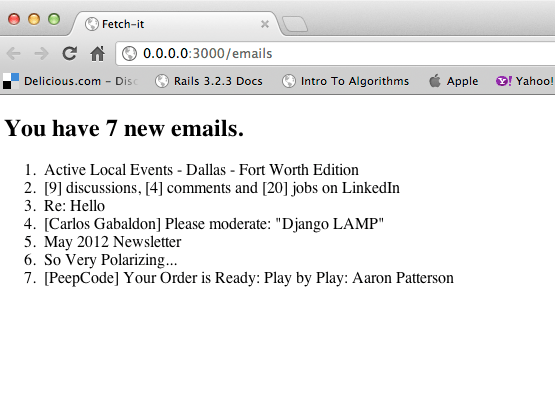
If we open our browser to http://0.0.0.0:3000/emails We should see something that looks like the following:
To finish things up let’s commit everything to git.
[~/ProjectsNew/fetch-it (master)⚡] ➔ git add .
[~/ProjectsNew/fetch-it (master)⚡] ➔ git commit -m "Get Email Feature"
[master 3423e4f] Get Email Feature
 21 files changed, 233 insertions(+), 327 deletions(-)
 rewrite README.rdoc (99%)
 create mode 100644 app/assets/javascripts/emails.js.coffee
 create mode 100644 app/assets/stylesheets/emails.css.scss
 create mode 100644 app/controllers/emails_controller.rb
 create mode 100644 app/helpers/emails_helper.rb
 create mode 100644 app/models/account.rb
 create mode 100644 app/models/email.rb
 create mode 100644 app/models/user.rb
 create mode 100644 app/views/emails/index.html.haml
 create mode 100644 app/views/layouts/application.html.haml
 rewrite config/routes.rb (97%)
 create mode 100644 db/migrate/20120527212233_create_users.rb
 create mode 100644 db/migrate/20120527213207_create_accounts.rb
 create mode 100644 db/migrate/20120528023430_create_emails.rb
 create mode 100644 db/schema.rb
 create mode 100644 features/get_email.feature
 create mode 100644 features/step_definitions/get_email_steps.rb
 create mode 100644 lib/gmail/client.rb
[~/ProjectsNew/fetch-it (master)⚡] ➔
What’s next
We covered a lot while building this application, but there are still a lot more we can do. What are some things we should do next?
- Marking emails that we download as read, right now every time we go to http://0.0.0.0:3000/emails the application will download and load the database with the same sets of emails. Essentially creating duplicate records in the database.
- Making the email list items clickable links that take you to the email detail.
- Adding an additional scenario to our ./features/get_email.feature for cases when there is no email on the server
- Other ideas?
The code
If you want to get the full application we built you can clone the repo on GitHub
[~/ProjectsNew] ➔ git clone https://CarlosGabaldon@github.com/CarlosGabaldon/fetch-it.git
 Carlos Gabaldon
The second step fails for me:
Scenario: Get new email from Gmail # features/get_email.feature:5
Given the user has a Gmail account # features/step_definitions/get_email_steps.rb:1
When they visit the index page # features/step_definitions/get_email_steps.rb:12
undefined method `join’ for “\”\” “:String (NoMethodError)
./lib/gmail/client.rb:28:in `block in fetch’
./lib/gmail/client.rb:23:in `each’
./lib/gmail/client.rb:23:in `fetch’
./app/models/email.rb:9:in `load_mail’
./app/controllers/emails_controller.rb:5:in `index’
./features/step_definitions/get_email_steps.rb:13:in `/^they visit the index page$/’
features/get_email.feature:7:in `When they visit the index page’
Then they will see a list of new email # features/step_definitions/get_email_steps.rb:16
Failing Scenarios:
cucumber features/get_email.feature:5 # Scenario: Get new email from Gmail
I think the ‘join’ failed when I had hundreds of unread Gmail messages. When I ran cucumber the next time it failed at a different place:
Scenario: Get new email from Gmail # features/get_email.feature:5
Given the user has a Gmail account # features/step_definitions/get_email_steps.rb:1
When they visit the index page # features/step_definitions/get_email_steps.rb:12
undefined local variable or method `emails’ for # (NameError)
./app/controllers/emails_controller.rb:7:in `index’
./features/step_definitions/get_email_steps.rb:13:in `/^they visit the index page$/’
features/get_email.feature:7:in `When they visit the index page’
Then they will see a list of new email # features/step_definitions/get_email_steps.rb:16
Failing Scenarios:
cucumber features/get_email.feature:5 # Scenario: Get new email from Gmail
1 scenario (1 failed)
3 steps (1 failed, 1 skipped, 1 passed)
0m1.643s
rake aborted!
Command failed with status (1): [/usr/local/bin/ruby -S bundle exec cucumbe…]
I figured it out. It should be respond_with(@emails). I am using Rails 3.1.0 so maybe the syntax you have used works with later versions?